Famvy for iPhone, iPad, Apple Watch and web
What your family actually lives on.
Spending apps tell you what you spent. Famvy takes the loans out of that number and shows what went to living — on the Today view and in a short letter once a month. The letter and the voice are made on the phone, and never leave it.
Download on the App StoreFirst month free. Then 49 kr a month or 449 kr a year, for the whole household.
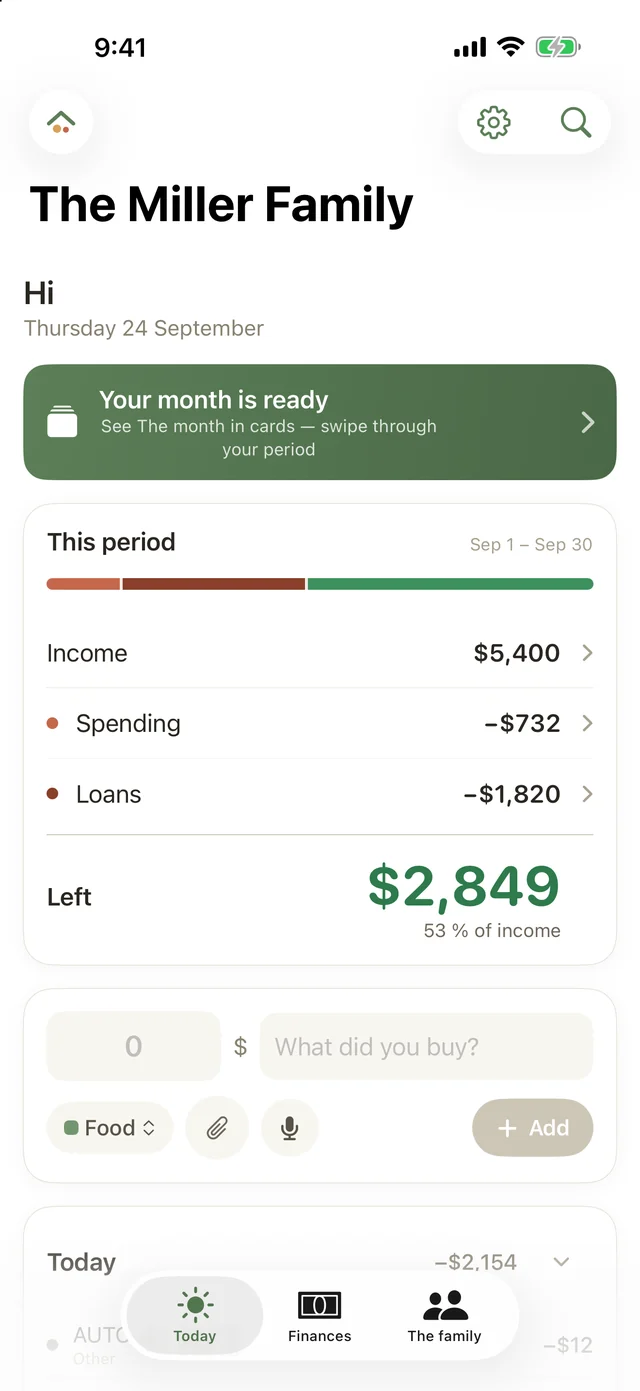
Living on. Not spent.
A mortgage payment is not a bad month. Famvy keeps the loans on their own line, so the figure you see is what the family actually lived on this period — from the day the salary lands, not from the first. A widget on the home screen keeps the period’s spending in view through the day.
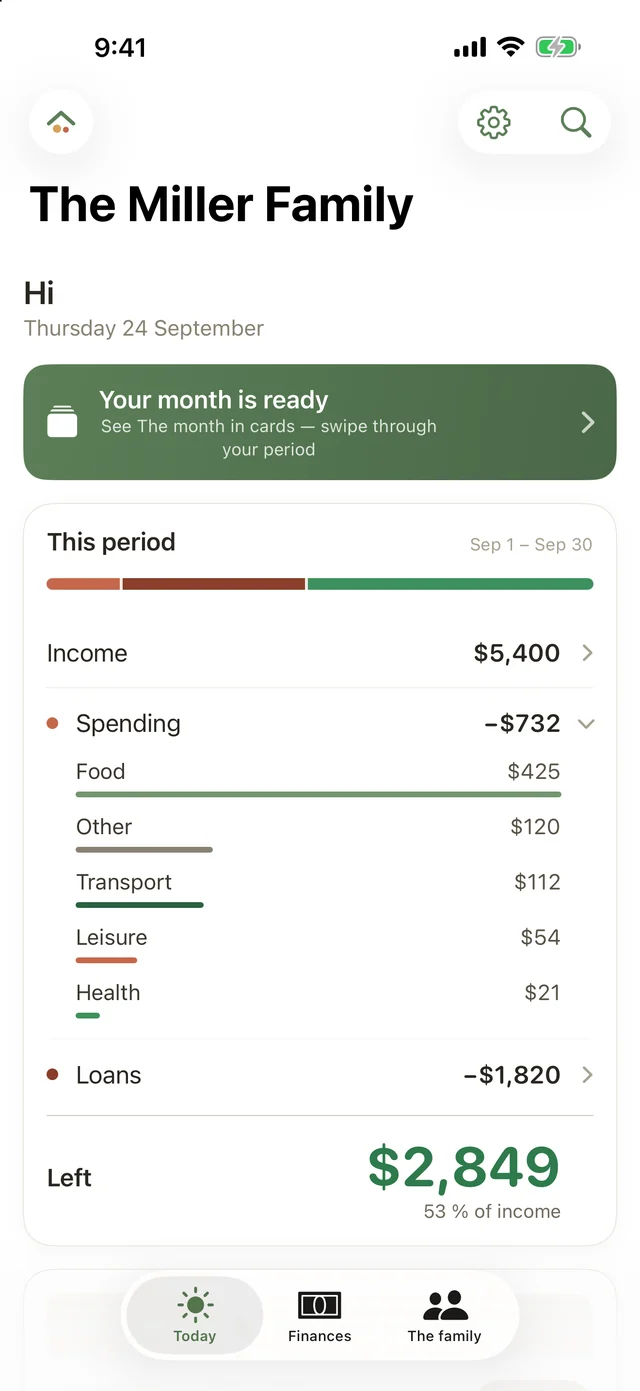
Three places. Today, Finances, Family.
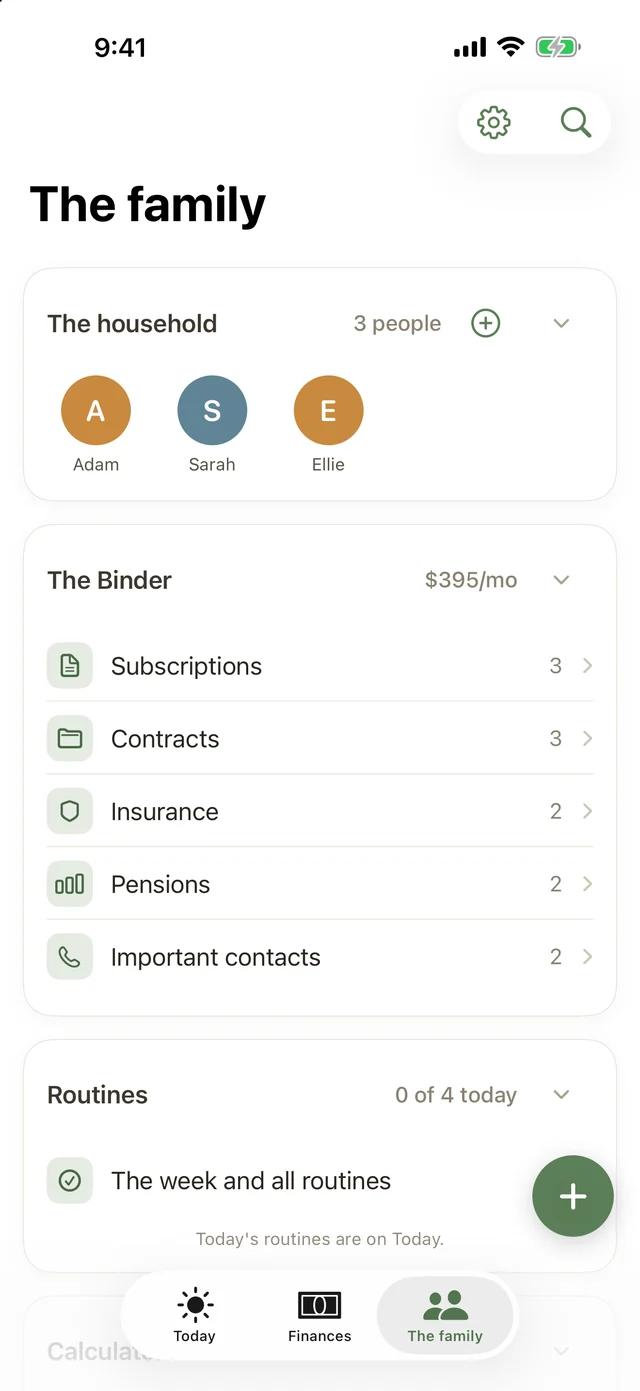
Today is home: the figures, a quick entry, the routines and the savings goal with its photo. Finances is the whole picture — accounts, budget, fixed costs, loans, the closing of the month — as cards you open when you need them. Family holds the household, the Binder with subscriptions, contracts, insurance and pensions, the routines and the calculators, quietly.
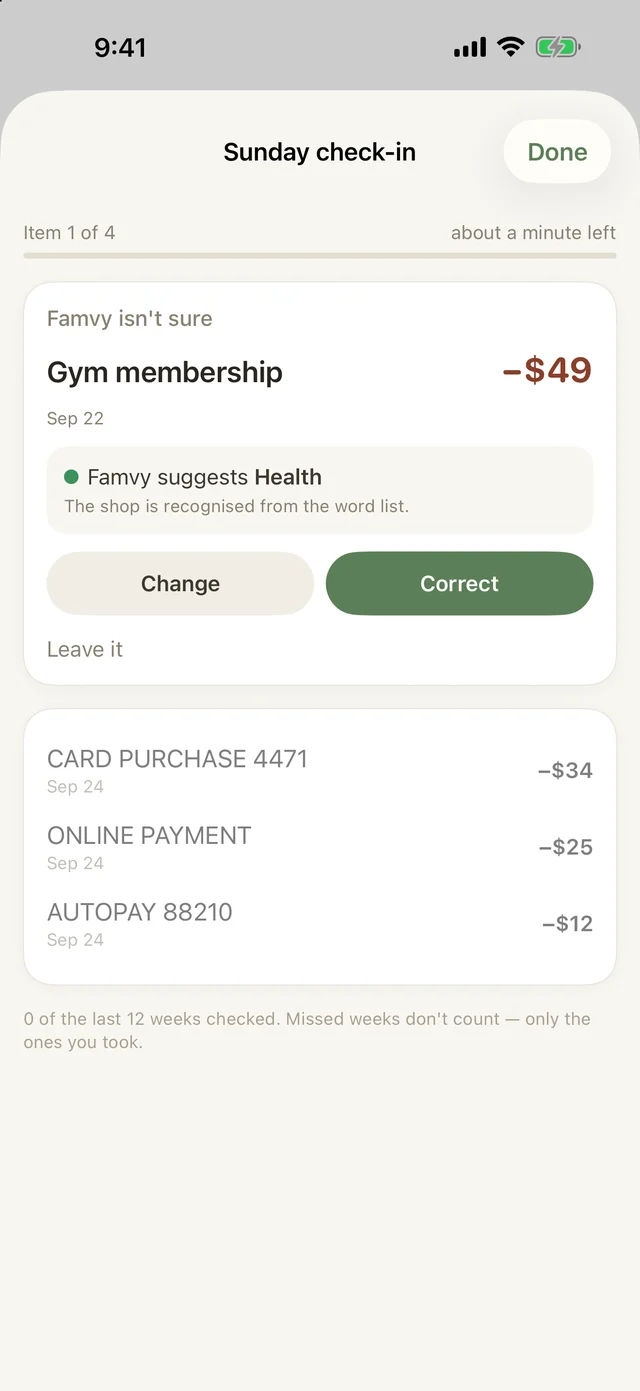
The Sunday check-in.
Once a week Famvy lines up the handful of rows it wasn’t sure about — five at most — and suggests a category for each. Two calm minutes, ideally together. Every answer teaches Famvy, so the same shop comes out right by itself next time. Skip a week and nothing happens.
The month’s letter.
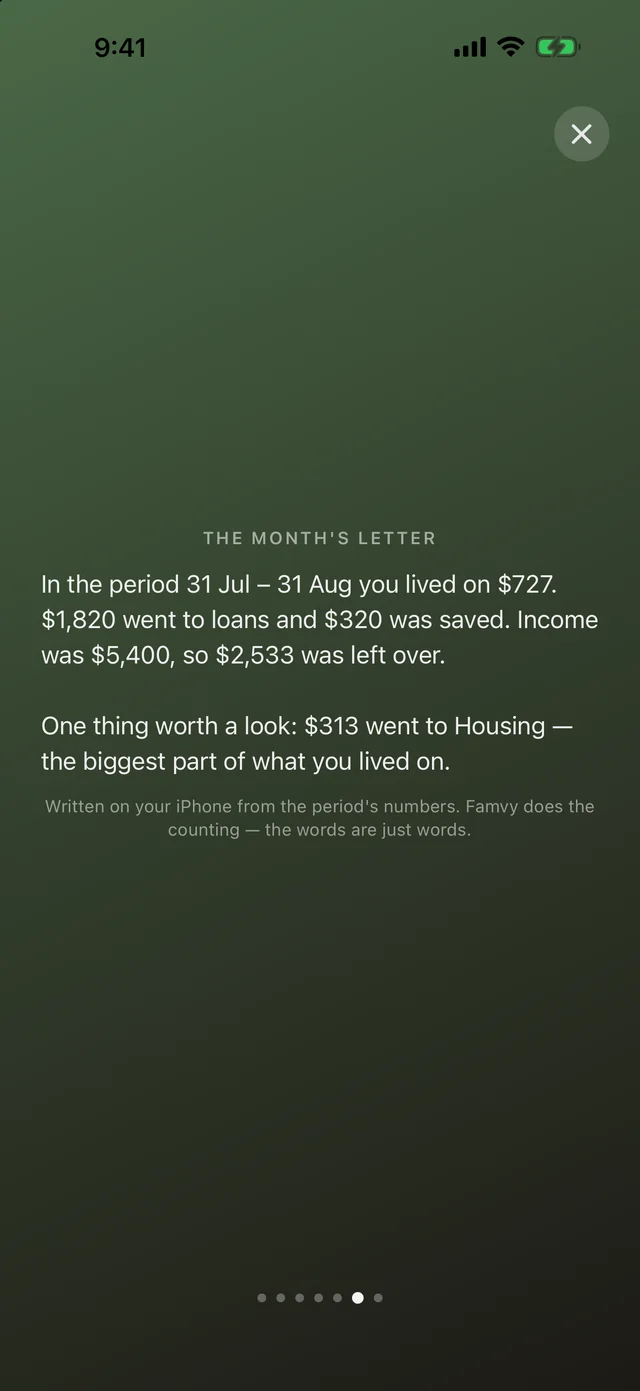
On payday, Famvy writes the family a short letter about the period that just ended: what came in, what went to living, what went to loans, what got saved — in plain words, in the first person plural. It is written on the phone, and every number in it is checked against your figures before you see it. It arrives as a notification on payday, and the notifications can be turned off.
Say it instead.
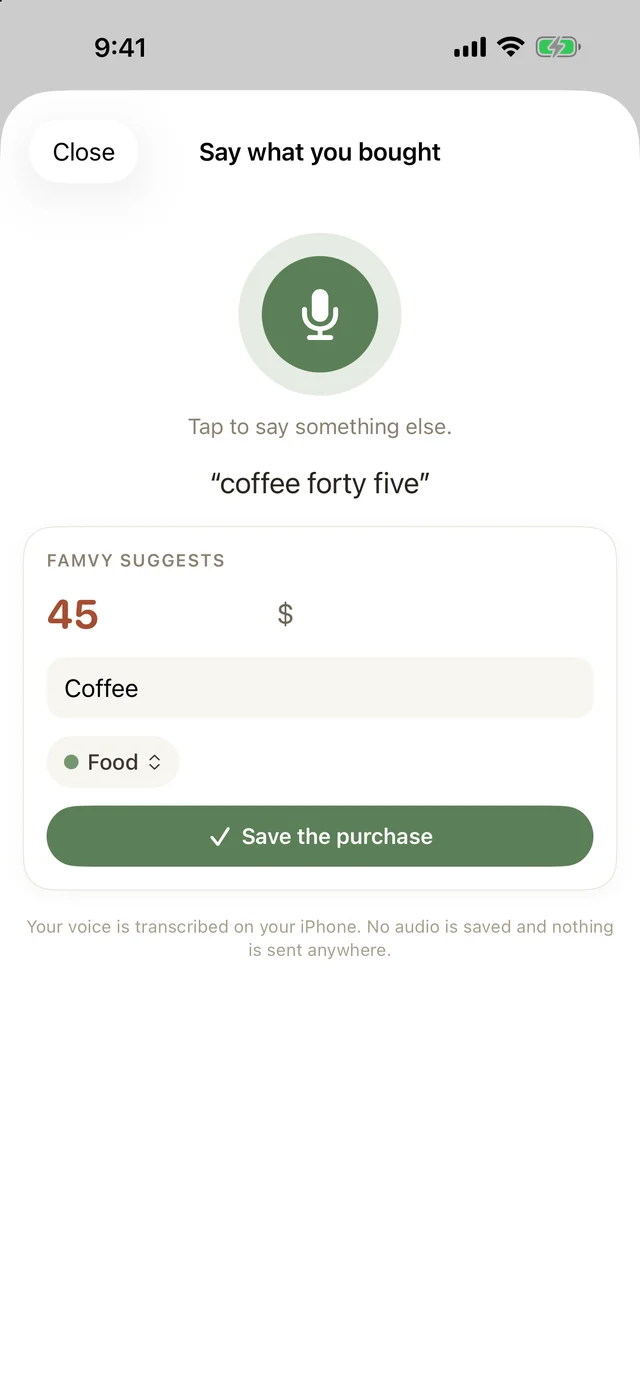
Hold the plus button and say “coffee, forty-five”. Famvy hears the amount and the words, guesses the category and shows you the row before it is saved. The listening happens on the phone — or not at all.
Six themes, six icons.
Pick a colour world and the whole app follows — the views, the cards, the widget, and now the icon on your home screen.
Famvy suggests.
Paste the rows from your bank and Famvy notices what comes back every period — the rent, the electricity, the insurance, the mortgage — and offers to file them as fixed costs or loans. You say yes or no. A no is remembered.
A guide for the first evening.
Which account to paste first, what to do about transfers, where the loans go. Five short steps inside the app, written for someone who has never done this before.
One subscription. The whole household.
- Everything in the app, from day one
- iPhone, iPad, Apple Watch and famvy.eu
- Invite your partner to the household
- Export and account deletion, always
Nothing is charged in the first month. Cancel in the App Store at any time.
- One purchase covers the family through Apple Family Sharing
- Encrypted sync on servers in the EU
- If it lapses, your figures stay readable
Prices vary by country; the App Store shows yours. In the US, $3.99 a month or $34.99 a year.
What it doesn’t do.
- No bank connection.Famvy never asks for your online-banking login. Export a file from your bank, or paste the rows — correct a row once and it comes out right next time. Your credentials are never near us, and Famvy can’t break because a bank changed its login page.
- No ads, no tracking, no selling data.Your figures live on your devices and, encrypted, on servers in the EU. The account exists to keep your iPhone, iPad, Watch and the web showing the same numbers — nothing else.
- Nothing is sent away to be understood.The letter is written on the phone and the voice is heard on the phone. No sound, no receipt and no figure is uploaded to be interpreted. Where the phone can’t do it, Famvy does less — it never does it elsewhere.
- It doesn’t pretend the first evening is five minutes.Entering the fixed costs, contracts and loans takes an evening. There is a guide for it. After that, the Sunday check-in and the letter are all the month asks of you.
Questions.
Does it need my bank login?
No. Choose the file your bank already exports, or paste the rows from your statement. Transfers between your own accounts don’t count as income or spending, and loan payments get their own line.
What is “living on”?
Your spending for the period with the loan payments taken out. A month with a big mortgage payment is not a month you overspent — it is a month you paid the bank. Famvy shows both figures, side by side, and puts the one you can act on first.
Can my partner see the same numbers?
Yes. Invite them to the household and you both see the same whole, on your own devices. One subscription covers the family through Apple Family Sharing.
Does the letter or the voice leave my phone?
No. Both are handled on the device. On a phone that can’t write the letter, you get a plainer version with the same figures; on a phone that can’t listen in your language on-device, Famvy says so and asks you to type instead.
What happens if I stop paying?
Your figures stay readable. Export and account deletion always work — in front of the paywall and behind it.
Which languages and countries?
English, Swedish, German and Spanish, in your own currency from the first launch, wherever the App Store sells it. Swedish amortisation rules show up only in Sweden.